
3.1. 第 2 周:数组
3.1.1. 欢迎!
在上一节课中,我们学习了 C,一种基于文本的编程语言。
本周,我们将更深入地探讨其他构建模块,以支持我们从底层学习更多编程知识的目标。
从根本上说,除了编程的基本要素外,本课程还关注问题解决。因此,我们还将进一步聚焦于如何应对计算机科学问题。
到课程结束时,你将学会如何使用上述这些构建模块来解决大量的计算机科学问题。
我们往往将计算机科学提供的许多解决方案视为理所当然。
3.1.2. 阅读等级
本课程中我们将解决的一个现实问题是理解阅读等级。
在一些同伴的帮助下,我们展示了不同阅读等级的读物。
本周我们将把量化阅读等级作为你们的众多编程挑战之一。
3.1.3. 调试
每个人在编码时都会犯错。
调试 是定位并移除代码中错误的过程。
在本课程中,你将使用的一种调试技术称为 橡皮鸭调试法 ,即你可以对着一个无生命的物体(或者你自己)说话,以帮助梳理代码思路并找出其未按预期运行的原因。当你的代码遇到问题时,不妨试着大声向一只真正的橡皮鸭讲述代码问题。如果你不想对着一只小塑料鸭说话,也欢迎向你身边的人倾诉!
我们创建了 CS50 Duck 和 CS50.ai 作为帮助你调试代码的工具。
考虑以下代码:
// Missing #include for stdio.h

int main(void)
{
    printf("hello, world\n");
}
注意
#include指令对于stdio.h是缺失的。此头文件是printf函数正常工作所必需的。缺少它,编译器将无法识别printf函数并生成错误。类似地,考虑以下代码:
// Misspelled stdio.h

#include <studio.h>

int main(void)
{
    printf("hello, world\n");
}
注意
stdio.h被误拼为studio.h。这个拼写错误会导致编译错误,因为编译器找不到名为studio.h的文件。正确的头文件名是stdio.h,它代表“标准输入/输出”。我们可能会忘记声明变量的类型:
// Missing cs50.h, variable's type, semicolon, %s, and second printf argument.

#include <stdio.h>

int main(void)
{
    name = get_string("What's your name? ")
    printf("hello, world\n");
}
注意这里存在多个错误。首先,
name的类型未声明。其次,缺少cs50.h库,导致我们无法使用string。第三,get_string调用后缺少分号。第四,printf语句实际上并未使用name变量。有些错误会提示错误消息。另一些是逻辑错误,不会提示消息,但会导致程序出现意外行为。
printf语句可用于调试代码。考虑以下示例:考虑上周的以下图像:

考虑以下故意插入错误的代码:
// Buggy example for printf

#include <stdio.h>

int main(void)
{
    for (int i = 0; i <= 3; i++)
    {
        printf("#\n");
    }
}
注意,此代码打印了四个块而不是三个。
在终端窗口中输入
code buggy.c并编写上述代码。运行此代码时,出现了四块砖,而非预期的三块。
printf是调试代码的非常有效的方法。你可以按如下方式修改代码:// Buggy example for printf #include <stdio.h> int main(void) { for (int i = 0; i <= 3; i++) { printf("i is %i\n", i); printf("#\n"); } }
注意这段代码如何在循环的每次迭代中输出
i的值,以便我们调试代码。运行此代码,你将看到多条语句,包括
i is 0、i is 1、i is 2和i is 3。看到这一点,你可能会意识到需要进一步修正代码如下:#include <stdio.h> int main(void) { for (int i = 0; i < 3; i++) { printf("#\n"); } }
注意
<=已被替换为<。此代码可进一步改进如下:
// Buggy example for debug50

#include <cs50.h>
#include <stdio.h>

void print_column(int height);

int main(void)
{
    int h = get_int("Height: ");
    print_column(h);
}

void print_column(int height)
{
    for (int i = 0; i <= height; i++)
    {
        printf("#\n");
    }
}
请注意,编译并运行此代码仍会导致错误。
为了解决这个错误,我们将使用一个新工具。
调试中的第二个工具称为 调试器 ,这是一种由程序员创建的软件工具,用于帮助追踪代码中的错误。
在 VS Code 中,已为你提供了一个预配置的调试器,名为
debug50。要使用此调试器,首先通过点击代码行左侧(紧邻行号左边)来设置一个 断点 。当你点击那里时,会看到一个红点出现。可以将其想象为一个停车标志,要求调试器暂停,以便你可以考虑代码这部分正在发生什么。
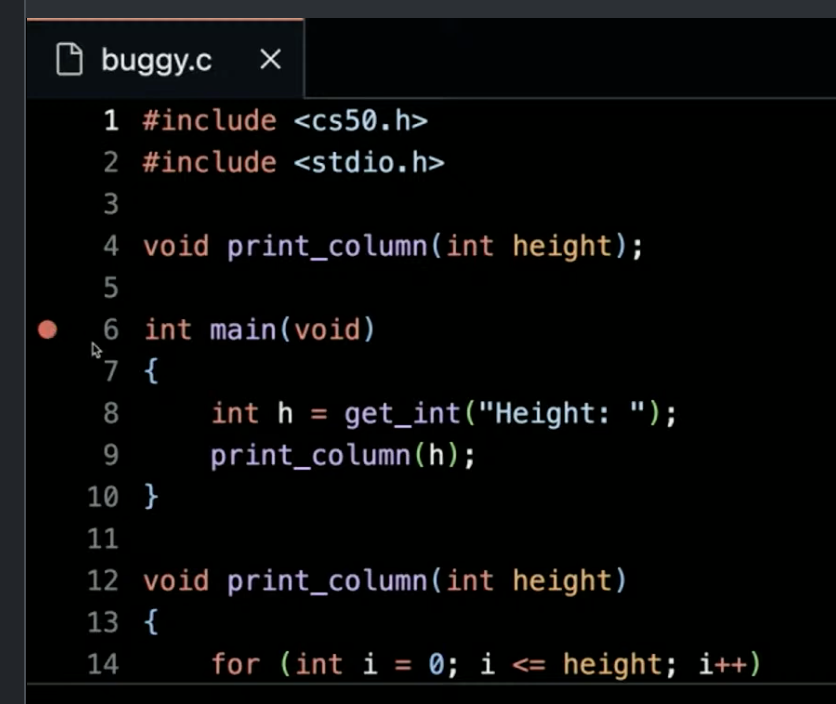
其次,运行
debug50 ./buggy。你会注意到调试器启动后,你的代码中有一行会以金色高亮显示。确切地说,代码已在此行 暂停 。请注意左上角如何显示所有局部变量,包括当前没有值的h。在窗口顶部,你可以点击step over按钮,它将继续逐行执行你的代码。请注意,随着你逐步执行循环,i的值是如何增加的。虽然此工具不会直接指出错误所在,但它能帮助你放慢速度,逐步观察代码的运行过程。你可以使用
step into来更深入地查看出错代码的细节。第三种调试方法是向橡皮鸭、无生命物体或他人讲述你所面临的问题以及为解决该问题所采取的具体步骤,以此作为发现错误的手段。
最后,也被称为 CS50 橡皮鸭 的调试工具,可以帮助你调试代码。
3.1.4. 编译
我们使用一种非常特殊的软件(称为 编译器 )将 源代码 转换为机器码。今天,我们将向你介绍一款编译器,它允许你将用 C 语言编写的源代码转换为机器码。

例如,你可能有一个如下所示的计算机程序:
#include <stdio.h>

int main(void)
{
    printf("hello, world\n");
}
编译器会将上述代码转换为机器码,其形式可能如下所示:
01010100 01001000 01001001 01010011
00100000 01001001 01010011 00100000
01000011 01010011 00110101 00110000
请注意,上述内容仅为示意。该问题对应的机器代码要长得多。
VS Code (作为 CS50 学生提供给你的编程环境)使用名为
clang(代表"C 语言系列前端”)的编译器。你可以在终端窗口中输入以下内容来编译代码:
clang -o hello hello.c。命令行参数 在命令行上以
-o hello hello.c的形式提供给clang。在终端窗口中运行
./hello,你的程序将按预期运行。考虑上周的以下代码:
#include <cs50.h>
#include <stdio.h>

int main(void)
{
    string name = get_string("What's your name? ");
    printf("hello, %s\n", name);
}
要编译此代码,你可以输入
clang -o hello hello.c -lcs50。如果你输入
make hello,它将运行一个命令,执行 clang 以创建一个你作为用户可以运行的输出文件。VS Code 已预先编程,以便
make会连同 clang 一起运行 numerous 命令行参数,从而为你作为用户提供便利。虽然上述内容仅作为示例,以便让你更深入地理解编译代码的过程和概念,但在 CS50 中使用
make是完全可行且符合预期的!编译涉及四个主要步骤,包括以下内容:
首先,预处理 是指代码中的头文件(由
#指定,例如#include <cs50.h>)被有效地复制并粘贴到你的文件中。在此步骤中,来自cs50.h的代码会被复制到你的程序中。同样,正如你的代码包含#include <stdio.h>一样,存储在你计算机上某处的stdio.h内的代码也会被复制到你的程序中。此步骤可可视化如下:string get_string(string prompt); int printf(string format, ...); int main(void) { string name = get_string("What's your name? "); printf("hello, %s\n", name); }
其次,编译 是将你的程序转换为汇编代码的步骤。此步骤可可视化如下:
... main: .cfi_startproc # BB#0: pushq %rbp .Ltmp0: .cfi_def_cfa_offset 16 .Ltmp1: .cfi_offset %rbp, -16 movq %rsp, %rbp .Ltmp2: .cfi_def_cfa_register %rbp subq $16, %rsp xorl %eax, %eax movl %eax, %edi movabsq $.L.str, %rsi movb $0, %al callq get_string movabsq $.L.str.1, %rdi movq %rax, -8(%rbp) movq -8(%rbp), %rsi movb $0, %al callq printf ...第三,汇编 涉及汇编器(编译器工具链中的一个工具)将你的汇编代码转换为机器码。此步骤可可视化如下:
01111111010001010100110001000110
00000010000000010000000100000000
00000000000000000000000000000000
00000000000000000000000000000000
00000001000000000011111000000000
00000001000000000000000000000000
00000000000000000000000000000000
...
最后,在 链接 步骤中,来自所包含库的预编译机器代码将与你的代码合并。然后输出最终的可执行文件。
01111111010001010100110001000110
00000010000000010000000100000000
00000000000000000000000000000000
00000000000000000000000000000000
00000001000000000011111000000000
00000001000000000000000000000000
00000000000000000000000000000000
00000000000000000000000000000000
00000000000000000000000000000000
00000000000000000000000000000000
10100000000000100000000000000000
00000000000000000000000000000000
00000000000000000000000000000000
01000000000000000000000000000000
00000000000000000100000000000000
00001010000000000000000100000000
01010101010010001000100111100101
01001000100000111110110000010000
00110001110000001000100111000111
01001000101111100000000000000000
00000000000000000000000000000000
00000000000000001011000000000000
11101000000000000000000000000000
00000000010010001011111100000000
00000000000000000000000000000000
00000000000000000000000001001000
...
3.1.5. 数组
在第 0 周,我们讨论了 数据类型 ,例如
bool、int、char、string等。每种数据类型都需要一定量的系统资源(这些是 CS50 环境中的典型大小):
bool1 字节int4 字节long8 字节float4 字节double8 字节char1 字节string? 字节
在你的计算机内部,可用的内存数量是有限的。
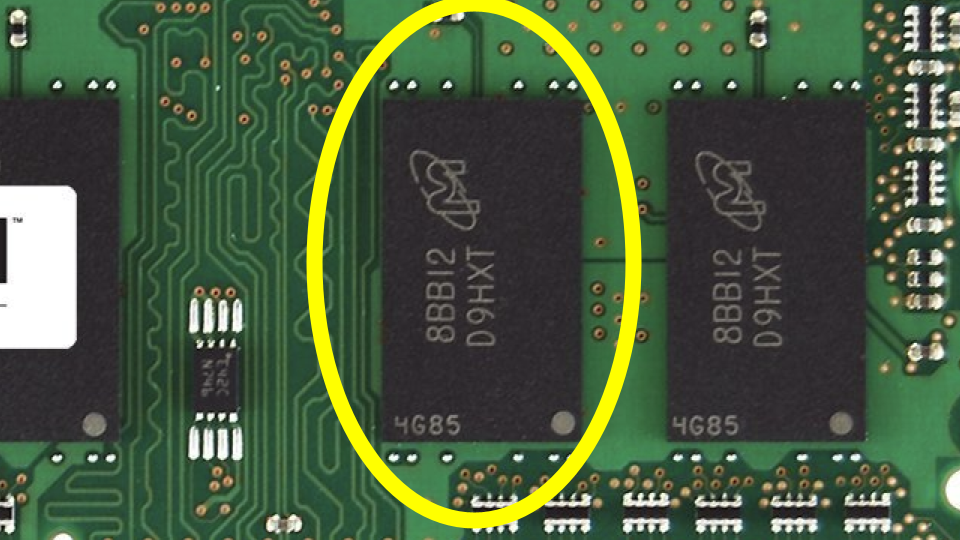
从物理角度看,在计算机内存中,你可以想象特定类型的数据是如何存储在计算机上的。你可能会想象一个
char(仅需 1 字节内存)可能如下所示: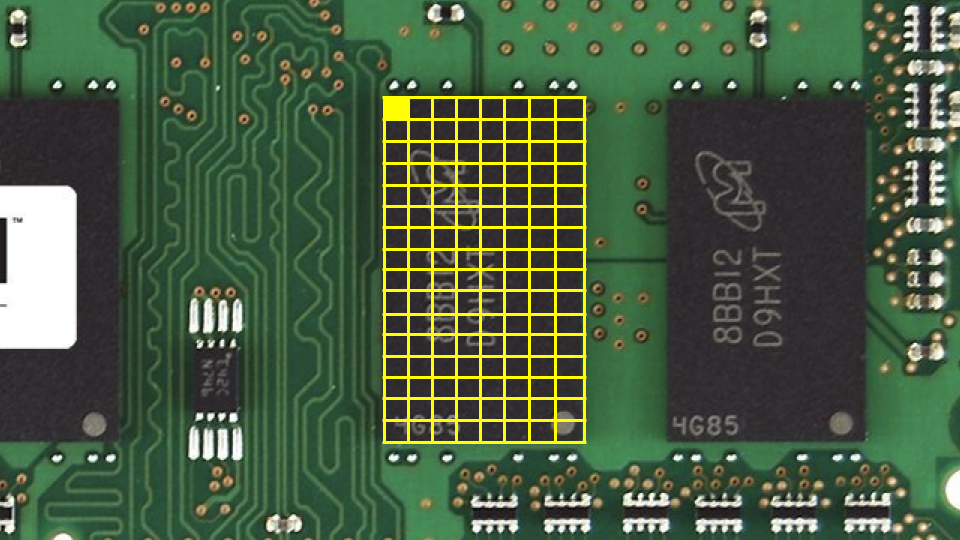
同样地,一个
int(需要 4 字节)可能如下所示: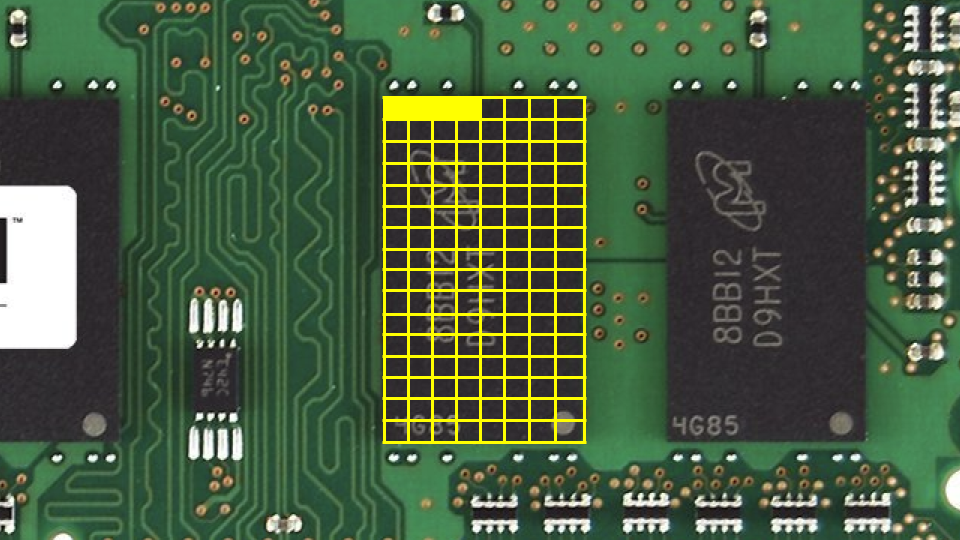
我们可以创建一个程序来探索这些概念。在终端中输入
code scores.c,并按如下方式编写代码:// Averages three (hardcoded) numbers #include <stdio.h> int main(void) { // Scores int score1 = 72; int score2 = 73; int score3 = 33; // Print average printf("Average: %f\n", (score1 + score2 + score3) / 3.0); }
注意右侧的数字是
3.0的浮点值,因此最终计算结果呈现为浮点值。运行
make scores会编译程序。然后运行./scores会执行它。你可以想象这些变量在内存中是如何存储的:
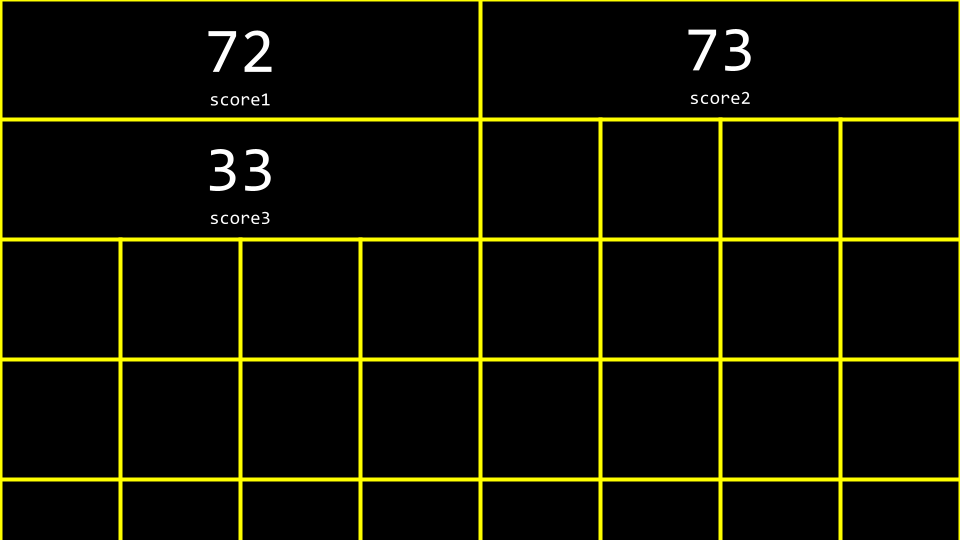
数组 是在内存中连续存储的一系列值。
int scores[3]是一种告诉编译器为你提供三个大小为int的连续内存位置以存储三个scores的方法。考虑到我们的程序,你可以按如下方式修改你的代码:// Averages three (hardcoded) numbers using an array #include <cs50.h> #include <stdio.h> int main(void) { // Scores int scores[3]; scores[0] = 72; scores[1] = 73; scores[2] = 33; // Print average printf("Average: %f\n", (scores[0] + scores[1] + scores[2]) / 3.0); }
请注意,
scores[0]通过indexing into名为scores的数组在位置0处的值来检查该内存位置的值,以查看其中存储了什么值。你可以看到,尽管上述代码能够运行,但仍有改进空间。请按以下方式修订你的代码:
// Averages three numbers using an array and a loop

#include <cs50.h>
#include <stdio.h>

int main(void)
{
    // Get scores
    int scores[3];
    for (int i = 0; i < 3; i++)
    {
        scores[i] = get_int("Score: ");
    }

    // Print average
    printf("Average: %f\n", (scores[0] + scores[1] + scores[2]) / 3.0);
}
注意我们如何使用
scores[i]索引到scores,其中i由for循环提供。我们可以简化或 抽象掉 平均值的计算。按如下方式修改你的代码:
// Averages three numbers using an array, a constant, and a helper function

#include <cs50.h>
#include <stdio.h>

// Constant
const int N = 3;

// Prototype
float average(int length, int array[]);

int main(void)
{
    // Get scores
    int scores[N];
    for (int i = 0; i < N; i++)
    {
        scores[i] = get_int("Score: ");
    }

    // Print average
    printf("Average: %f\n", average(N, scores));
}

float average(int length, int array[])
{
    // Calculate average
    int sum = 0;
    for (int i = 0; i < length; i++)
    {
        sum += array[i];
    }
    return sum / (float) length;
}
请注意,这里声明了一个名为
average的新函数。此外,请注意这里声明了一个const或值为N的常量。最重要的是,请注意average函数如何接收int array[],这意味着该函数可以接收一个数组作为参数。数组不仅可以作为容器:它们还可以在函数之间传递。
3.1.6. 字符串
string仅仅是char类型的值组成的数组:一个字符数组。要探索
char和string,请在终端窗口中输入code hi.c并按如下方式编写代码:// Prints chars #include <stdio.h> int main(void) { char c1 = 'H'; char c2 = 'I'; char c3 = '!'; printf("%c%c%c\n", c1, c2, c3); }
请注意,这将输出一串字符。
同样地,对你的代码进行以下修改:
// Prints chars' ASCII codes

#include <stdio.h>

int main(void)
{
    char c1 = 'H';
    char c2 = 'I';
    char c3 = '!';

    printf("%i %i %i\n", c1, c2, c3);
}
请注意,ASCII 码是通过将
%c替换为%i来打印的。观察下图,你可以看到字符串是一个字符数组,它从第一个字符开始,并以一个称为
NUL character的特殊字符结束(注意:只有一个 L 的 NUL 是'\0'字符,不同于有两个 L 的 NULL):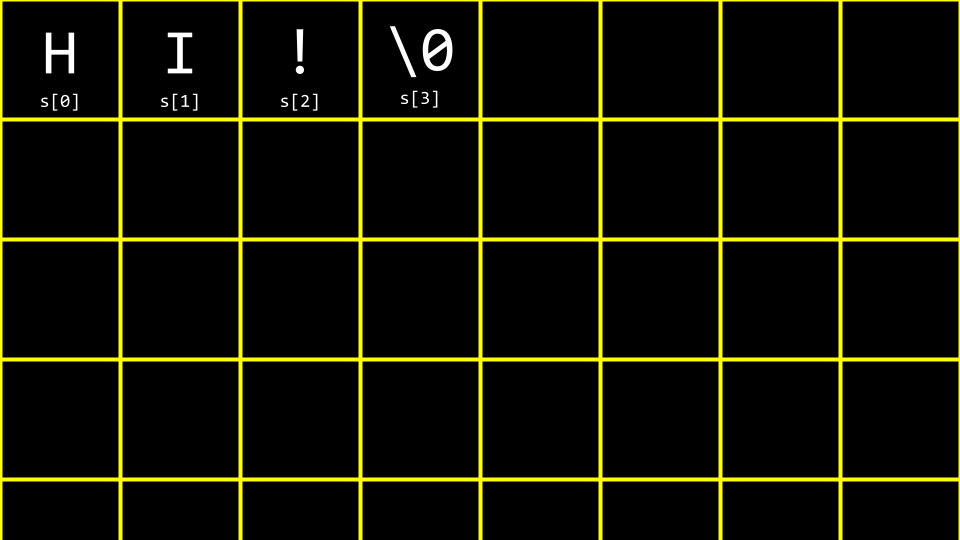
用十进制想象这一点,你的数组将如下所示:
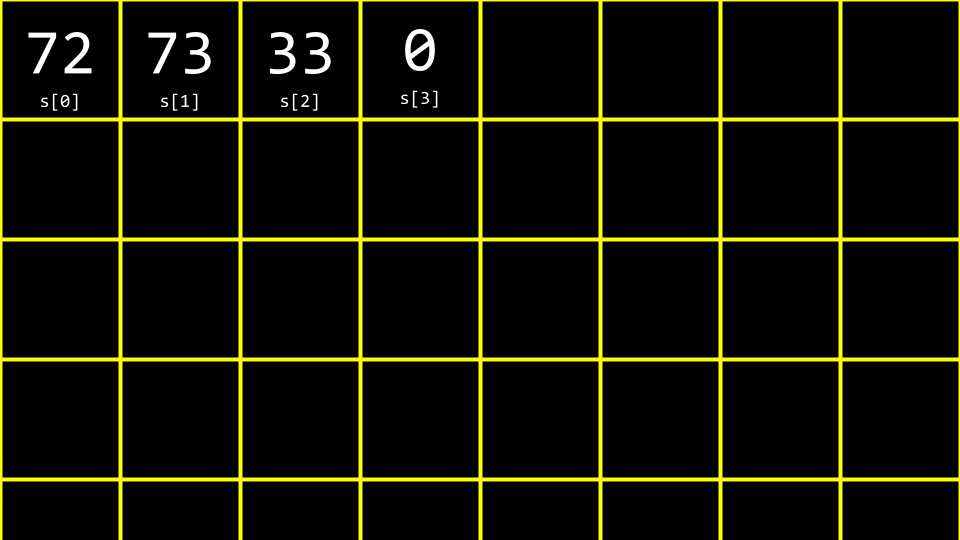
我们可以将上述内容想象如下:
// Prints string

#include <cs50.h>
#include <stdio.h>

int main(void)
{
    string s = "HI!";
    printf("%s\n", s);
}
注意,所有字符都在
string范围内表示。为了进一步理解
string的工作原理,请按如下方式修改你的代码:// Treats string as array #include <cs50.h> #include <stdio.h> int main(void) { string s = "HI!"; printf("%c%c%c\n", s[0], s[1], s[2]); }
注意
printf语句如何从名为s的数组中呈现三个值。如前所述,我们可以将
%c替换为%i,如下所示:// Prints string's ASCII codes, including NUL #include <cs50.h> #include <stdio.h> int main(void) { string s = "HI!"; printf("%i %i %i %i\n", s[0], s[1], s[2], s[3]); }
注意,这会打印字符串的 ASCII 码,包括 NUL。
让我们想象我们想要同时表示
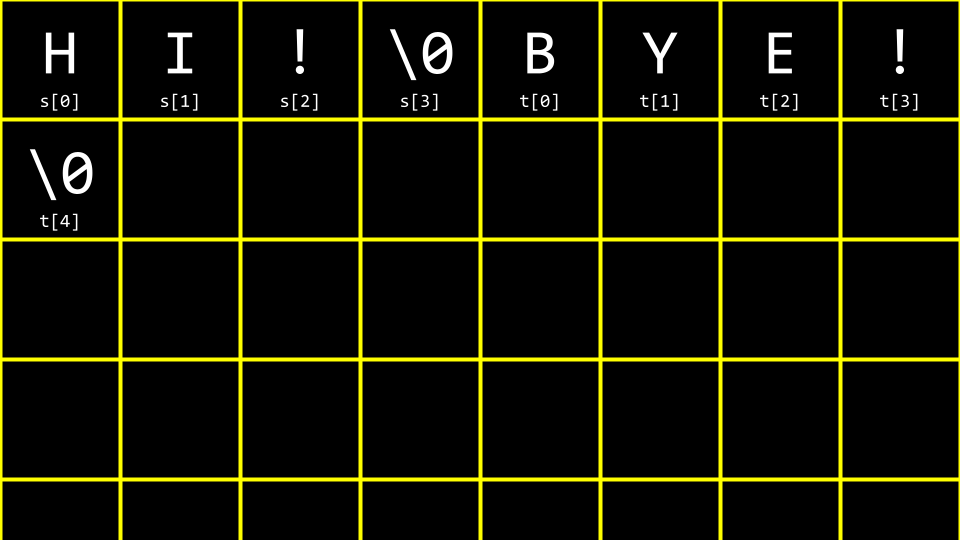
HI!和BYE!。请按如下方式修改你的代码:// Multiple strings #include <cs50.h> #include <stdio.h> int main(void) { string s = "HI!"; string t = "BYE!"; printf("%s\n", s); printf("%s\n", t); }
请注意,本示例中声明并使用了两个字符串。
你可以将其可视化如下:
我们可以进一步优化此代码。请按以下方式修改你的代码:
// Array of strings

#include <cs50.h>
#include <stdio.h>

int main(void)
{
    string words[2];

    words[0] = "HI!";
    words[1] = "BYE!";

    printf("%s\n", words[0]);
    printf("%s\n", words[1]);
}
请注意,两个字符串都存储在一个类型为
string的单个数组中。我们可以将两个字符串合并为一个字符串数组。
#include <cs50.h>
#include <stdio.h>

int main(void)
{
    string words[2];

    words[0] = "HI!";
    words[1] = "BYE!";

    printf("%c%c%c\n", words[0][0], words[0][1], words[0][2]);
    printf("%c%c%c%c\n", words[1][0], words[1][1], words[1][2], words[1][3]);
}
注意创建了一个
words的数组。这是一个字符串数组。每个单词都存储在words中。
3.1.7. 字符串长度
编程中(尤其是 C 语言)的一个常见问题是确定字符串的长度。我们如何在代码中实现这一点?在终端窗口中输入
code length.c,并按如下方式编写代码:// Determines the length of a string #include <cs50.h> #include <stdio.h> int main(void) { // Prompt for user's name string name = get_string("Name: "); // Count number of characters up until '\0' (aka NUL) int n = 0; while (name[n] != '\0') { n++; } printf("%i\n", n); }
请注意,此代码会循环直到找到 NUL 字符。
此代码可以通过将计数逻辑抽象为函数来改进,如下所示:
// Determines the length of a string using a function

#include <cs50.h>
#include <stdio.h>

int string_length(string s);

int main(void)
{
    // Prompt for user's name
    string name = get_string("Name: ");
    int length = string_length(name);
    printf("%i\n", length);
}

int string_length(string s)
{
    // Count number of characters up until '\0' (aka NUL)
    int n = 0;
    while (s[n] != '\0')
    {
        n++;
    }
    return n;
}
请注意,一个名为
string_length的新函数会统计字符数量,直到找到 NUL 为止。由于这是编程中非常常见的问题,其他程序员已在
string.h库中创建了用于查找字符串长度的代码。你可以通过按以下方式修改代码来查找字符串的长度:// Determines the length of a string using a function #include <cs50.h> #include <stdio.h> #include <string.h> int main(void) { // Prompt for user's name string name = get_string("Name: "); int length = strlen(name); printf("%i\n", length); }
请注意,此代码使用了在文件顶部声明的
string.h库。此外,它还使用了该库中名为strlen的函数,该函数用于计算传入字符串的长度。我们的代码可以站在前人的肩膀上,使用他们创建的库。
ctype.h是另一个非常有用的库。假设我们想要创建一个程序,将所有小写字母转换为大写字母。在终端窗口中,输入code uppercase.c并编写如下代码:// Uppercases a string #include <cs50.h> #include <stdio.h> #include <string.h> int main(void) { string s = get_string("Before: "); printf("After: "); for (int i = 0, n = strlen(s); i < n; i++) { if (s[i] >= 'a' && s[i] <= 'z') { printf("%c", s[i] - 32); } else { printf("%c", s[i]); } } printf("\n"); }
请注意,此代码 遍历 字符串中的每个值。程序会检查每个字符。如果字符是小写字母,则从其 ASCII 值中减去 32 以将其转换为大写字母。
回顾我们上周的工作,你可能还记得这张 ASCII 值图表:
0   NUL  16  DLE  32  SP  48  0  64  @  80  P  96   `  112  p
1   SOH  17  DC1  33  !   49  1  65  A  81  Q  97   a  113  q
2   STX  18  DC2  34  ”   50  2  66  B  82  R  98   b  114  r
3   ETX  19  DC3  35  #   51  3  67  C  83  S  99   c  115  s
4   EOT  20  DC4  36  $   52  4  68  D  84  T  100  d  116  t
5   ENQ  21  NAK  37  %   53  5  69  E  85  U  101  e  117  u
6   ACK  22  SYN  38  &   54  6  70  F  86  V  102  f  118  v
7   BEL  23  ETB  39  ’   55  7  71  G  87  W  103  g  119  w
8   BS   24  CAN  40  (   56  8  72  H  88  X  104  h  120  x
9   HT   25  EM   41  )   57  9  73  I  89  Y  105  i  121  y
10  LF   26  SUB  42  *   58  :  74  J  90  Z  106  j  122  z
11  VT   27  ESC  43  +   59  ;  75  K  91  [  107  k  123  {
12  FF   28  FS   44  ,   60  <  76  L  92     108  l  124  |
13  CR   29  GS   45  -   61  =  77  M  93  ]  109  m  125  }
14  SO   30  RS   46  .   62  >  78  N  94  ^  110  n  126  ~
15  SI   31  US   47  /   63  ?  79  O  95  _  111  o  127  DEL
当从 ASCII 小写字母(a-z)中减去
32时,结果是该字母的大写版本。注意,这仅适用于 ASCII 字母 a-z,不适用于带重音符号或非 ASCII 字符。虽然程序实现了我们的目标,但使用
ctype.h库有一种更简单的方法。请按以下方式修改你的程序:// Uppercases string using ctype library (and an unnecessary condition) #include <cs50.h> #include <ctype.h> #include <stdio.h> #include <string.h> int main(void) { string s = get_string("Before: "); printf("After: "); for (int i = 0, n = strlen(s); i < n; i++) { if (islower(s[i])) { printf("%c", toupper(s[i])); } else { printf("%c", s[i]); } } printf("\n"); }
注意,程序会遍历字符串中的每个字符。
toupper函数被传入s[i]。每个字符(如果是小写)都会被转换为大写。值得一提的是,
toupper会自动将小写字母转换为大写。因此,你的代码可以简化如下:// Uppercases string using ctype library #include <cs50.h> #include <ctype.h> #include <stdio.h> #include <string.h> int main(void) { string s = get_string("Before: "); printf("After: "); for (int i = 0, n = strlen(s); i < n; i++) { printf("%c", toupper(s[i])); } printf("\n"); }
请注意,此代码使用
ctype库将字符串转换为大写。你可以在 Manual Pages 上阅读关于
ctype库所有功能的介绍。
3.1.8. 命令行参数
Command-line arguments是那些在命令行传递给你的程序的参数。例如,你在clang之后输入的所有语句都被视为命令行参数。你可以在自己的程序中使用这些参数!在你的终端窗口中,输入
code greet.c并按如下方式编写代码:// Uses get_string #include <cs50.h> #include <stdio.h> int main(void) { string answer = get_string("What's your name? "); printf("hello, %s\n", answer); }
请注意,这对用户显示为
hello。不过,如果能够在程序运行之前就接受参数,那岂不是更好?请按以下方式修改你的代码:
// Prints a command-line argument

#include <cs50.h>
#include <stdio.h>

int main(int argc, string argv[])
{
    if (argc == 2)
    {
        printf("hello, %s\n", argv[1]);
    }
    else
    {
        printf("hello, world\n");
    }
}
请注意,该程序同时知道
argc(命令行参数的数量)和argv(作为命令行参数传递的字符串数组)。因此,使用该程序的语法,执行
./greet David会导致程序输出hello, David。你可以使用以下代码打印每个命令行参数:
// Prints command-line arguments

#include <cs50.h>
#include <stdio.h>

int main(int argc, string argv[])
{
    for (int i = 0; i < argc; i++)
    {
        printf("%s\n", argv[i]);
    }
}
请注意,此代码将每个命令行参数单独打印在一行上。第一个参数(argv[0])始终是程序本身的名称,后面跟随运行程序时提供的任何参数。
3.1.9. 退出状态
当程序结束时,会向计算机提供一个特殊的退出码。
当程序无错误退出时,会向计算机提供状态码
0。通常,当发生导致程序终止的错误时,会向计算机提供状态1。你可以编写如下程序,通过输入
code status.c并按以下方式编写代码来说明这一点:// Returns explicit value from main #include <cs50.h> #include <stdio.h> int main(int argc, string argv[]) { if (argc != 2) { printf("Missing command-line argument\n"); return 1; } printf("hello, %s\n", argv[1]); return 0; }
请注意,如果你未提供
./status David,将获得退出状态1。然而,如果你提供了./status David,将获得退出状态0。你可以在终端中输入
echo $?来查看上一条运行命令的退出状态。你可以想象如何利用上述程序的部分代码来检查用户是否提供了正确数量的命令行参数。
3.1.10. 总结
在本课中,你学习了关于编译以及数据如何在计算机内存储的更多细节。具体来说,你学到了…
编译器的一般工作原理。
如何使用四种方法调试代码。
如何在代码中使用数组。
数组如何在内存的连续部分存储数据。
字符串仅仅是字符数组。
如何在代码中与数组交互。
如何将命令行参数传递给程序。
下次再见!